
Conversion-Focused New Features & Improvements
Last Updated: Dec 23, 2025 by Editorial Team | Reviewed by: Ian Bass
Over the past few months, we’ve released several new features and refinements inside OptimizePress that we haven’t formally announced yet.
Rather than drip-feeding individual updates, this post brings everything together in one place.
These updates make OptimizePress easier to use, help you design better mobile experiences for your audience, and keep important calls to action visible on your pages.
Your website, landing pages, and funnels are meant to drive action, and these improvements are designed to support that goal.
OptimizeUrgency Refresh: Built to Convert And Easier to Use
One of the strongest drivers of action on a page is seeing that other people are already taking action.
Recent activity and visible momentum help new visitors feel more confident opting in, registering, or buying. OptimizeUrgency is designed to surface that activity in a clear, trustworthy way.
What Urgency allows you to show on your pages
Real subscriber activity: Display alerts such as “X just opted in for [guide or resource]”, helping new visitors see that others are already engaging.
Live purchase and checkout activity: Show recent purchases or sign-ups to reinforce that offers are being actively taken up, not ignored.
Third-party activity from your existing tools: Pull in activity alerts from platforms such as WooCommerce, ThriveCart, and SamCart, keeping your pages connected to real customer behaviour.
Manually created alerts for planned campaigns: Pre-load alerts to support launches, promotions, or evergreen funnels where live activity may fluctuate.
New content notifications from your site: Highlight recent blog posts or updates to signal freshness and ongoing activity.
Live visitor counts: Show how many people are currently viewing a page to reinforce momentum and relevance.
Why this works
Seeing recent and real activity reduces uncertainty.
Instead of asking visitors to be the first to act, OptimizeUrgency shows that action is already happening. That social proof, combined with recency, helps visitors feel more comfortable taking the next step themselves.
What’s improved in this update
The underlying conversion psychology has not changed. The experience of using OptimizeUrgency has.
- A cleaner, more intuitive interface
- Faster setup with clearer controls
- Less friction between identifying where urgency should be used and actually implementing it
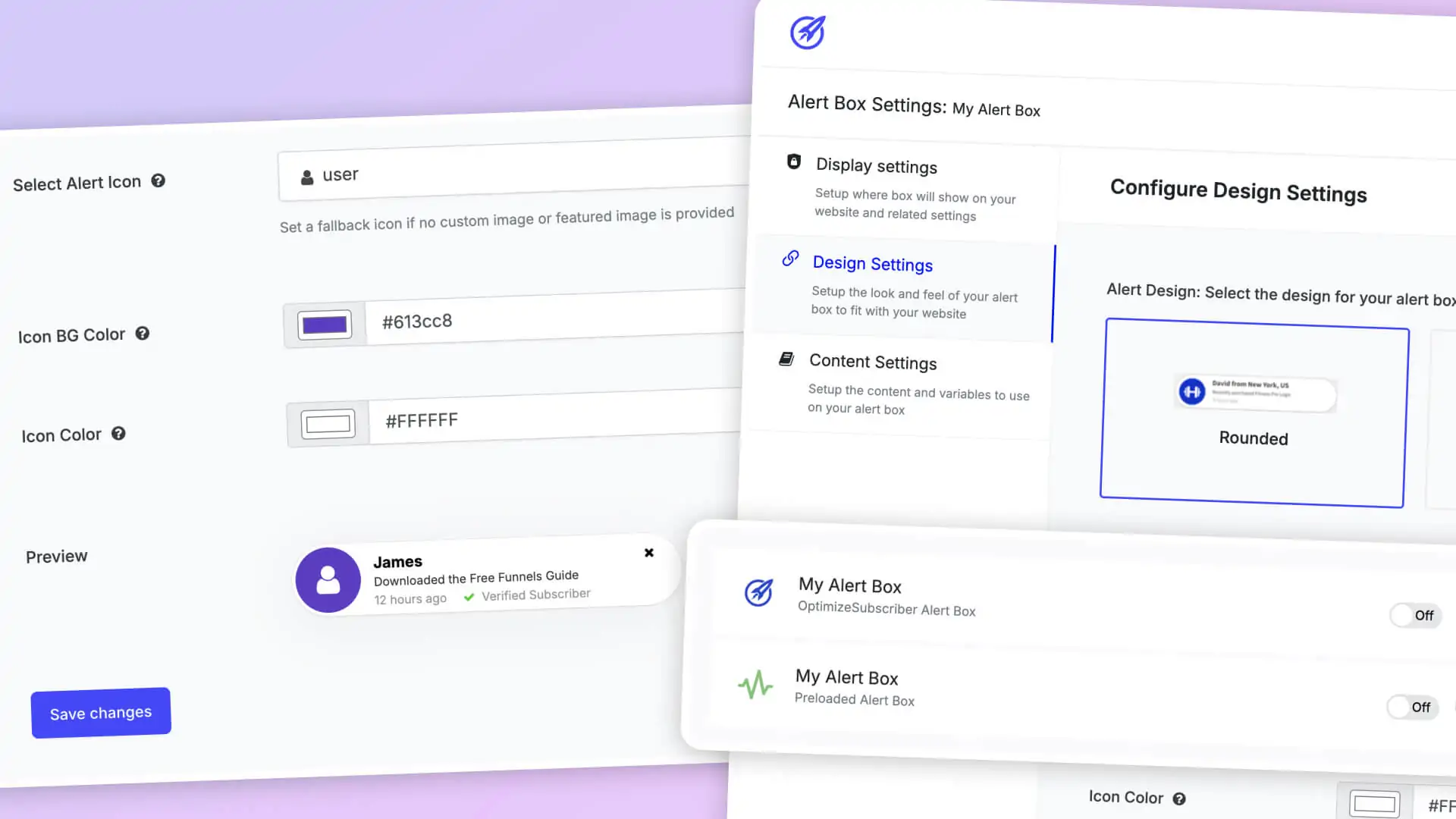
This matters because urgency only works when it is applied confidently and consistently. If it feels complicated or risky to configure, it often isn't used at all.
The refresh removes that barrier, making one of OptimizePress’s most effective conversion tools easier to deploy correctly.
Ready to get better results from your landing pages & blogs in WordPress?
Discover conversion optimized landing pages, funnels and blog themes that make editing easy and get you better results.
14 day money back guarantee
Mobile Responsive Device Previews
Most websites now get most of their traffic from mobile devices. Despite that, many pages are still designed primarily for desktop and are only briefly checked on mobile.
That gap is now easier to close.
What’s new
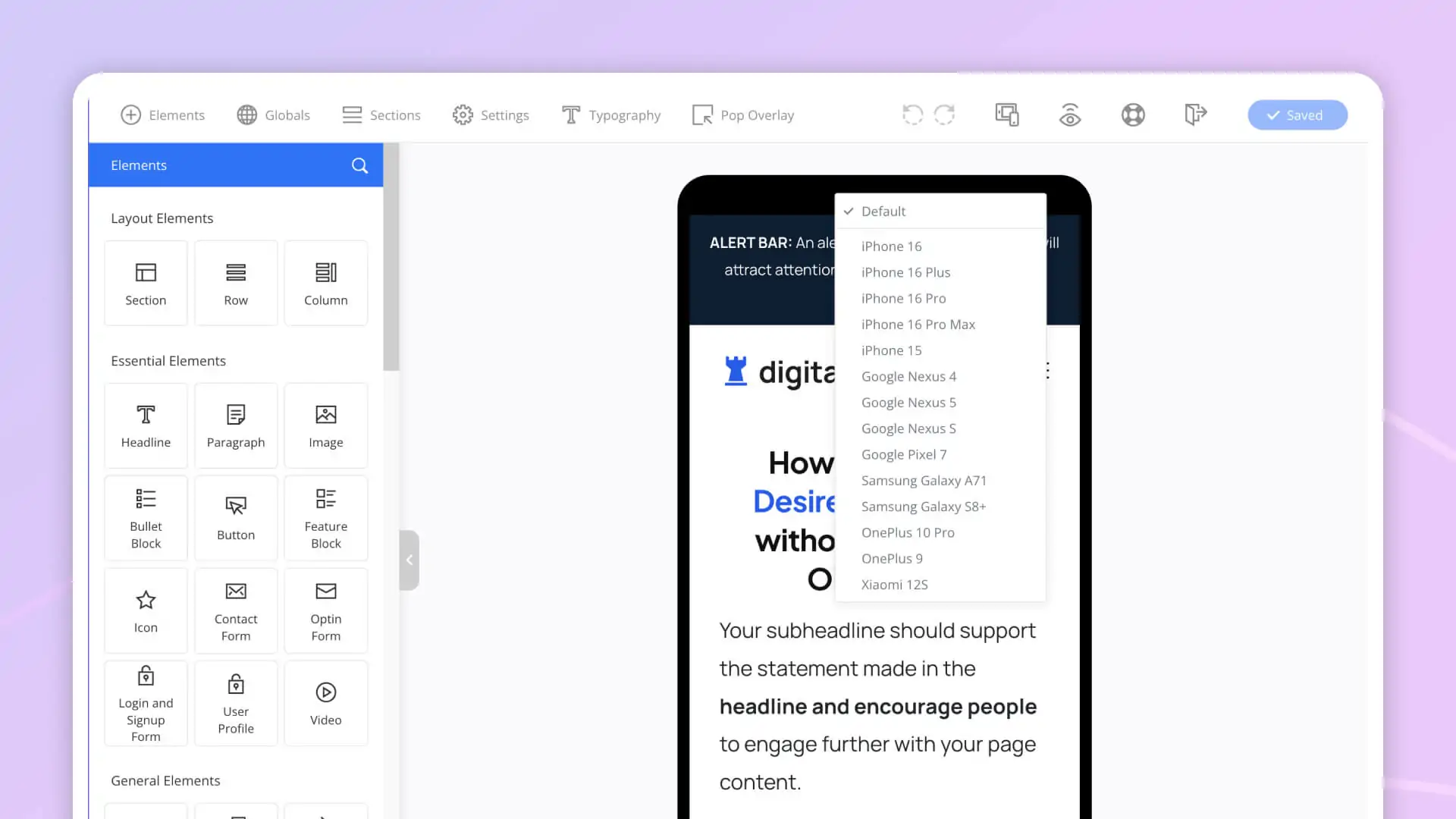
You can now preview your pages on specific, real-world devices, including popular options such as:
- iPhone 16 Pro
- iPad Air
- Samsung Galaxy S25
- Google Nexus 5
- Google Pixel 7
This goes beyond a generic “mobile view” and reflects how your pages actually appear on common devices.
Why this matters
If your analytics show that a large percentage of visitors come from a specific device type, designing without that context is a risk.
Device-specific previews help you:
- Catch spacing, layout, and readability issues early
- Optimise call-to-action placement for real screen sizes
- Design pages that feel intentional on the devices your audience actually uses
This makes mobile optimisation more practical and less guesswork-driven.
Easy to use: Simply right-click anywhere on the device outline to trigger the specific device menu.
New: Stick to Bottom Sections
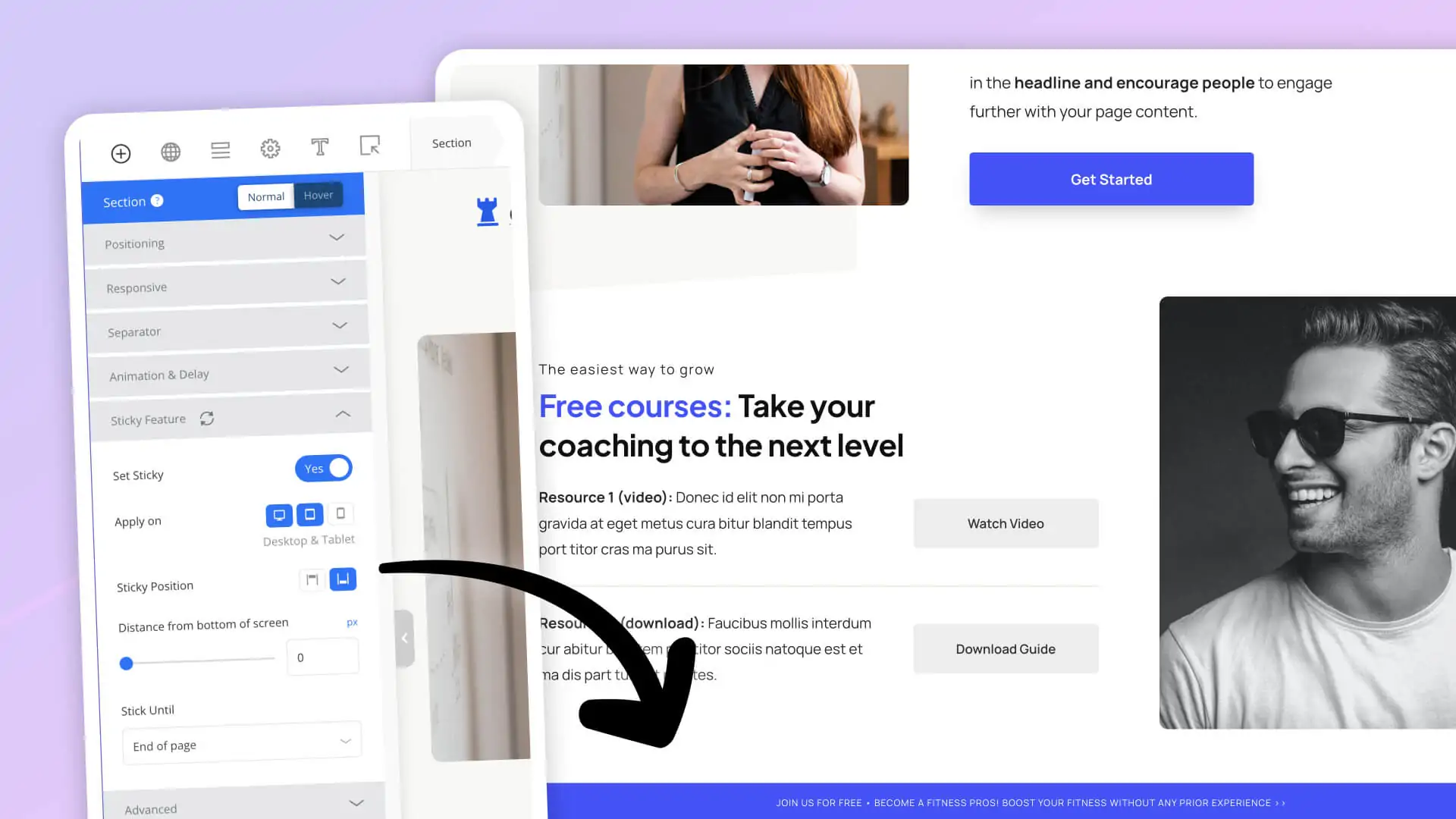
Stick to Bottom Sections and Rows, keep a selected section or row of your page visible at the bottom of the browser window as visitors scroll.
Instead of relying on visitors reaching a specific point on the page, you can ensure important information stays in view.
How it works
You select a section or row, toggle on the “set sticky” feature, and select “Stick Until End Of Page,” and that will fix that section or row to the bottom of the screen so it remains visible while the rest of the page scrolls normally.
Common use cases
- Opt-in prompts
- Event promotions or reminders
- Limited-time sales offers
- Key announcements or messages
Why this helps
On longer pages, visitors often scroll past important sections without acting.
Stick to Bottom Sections helps by:
- Keeping calls to action visible without interrupting the reading experience
- Reinforcing key messages at the moment visitors are ready to act
- Reducing reliance on scroll depth to drive engagement
Ready to get better results from your landing pages & blogs in WordPress?
Discover conversion optimized landing pages, funnels and blog themes that make editing easy and get you better results.
14 day money back guarantee
Opt-In Form Conditional Redirects
Not all subscribers should see the same next step.
With conditional redirects, you can now tailor the experience immediately after someone opts in.
What’s new
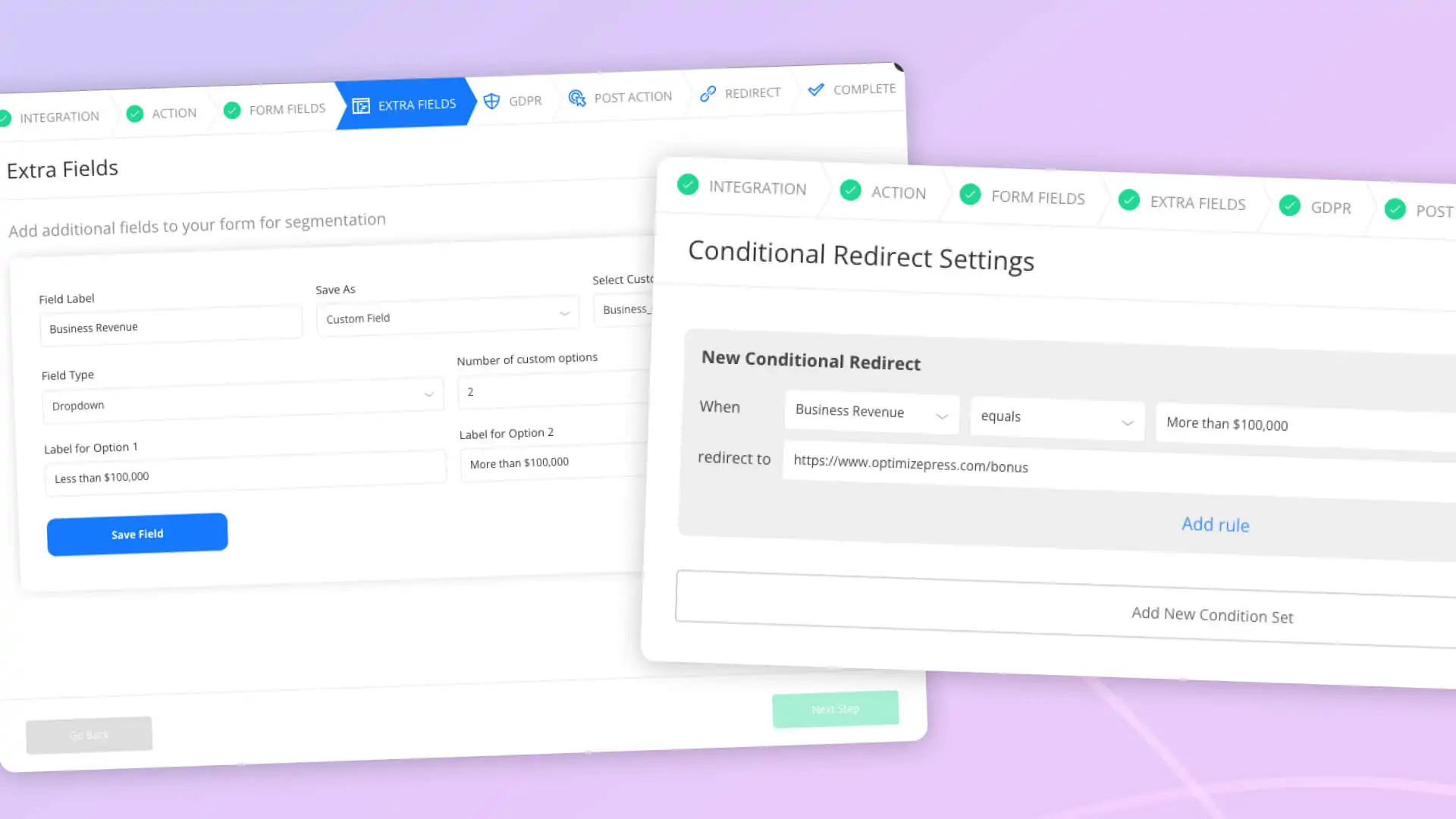
You can redirect visitors to different thank-you pages based on their responses to a custom field in your opt-in form.
For example:
- The subscriber confirms their annual revenue, and you redirect them to a thank-you page aligned with their business turnover segment.
- Subscriber shares their experience level in your niche; forward them to a thank-you page tailored to their goals.
Why this matters
This allows you to:
- Create more relevant and personalised thank you page experiences
- Improve engagement by matching intent with content
- Start segmentation earlier, without extra tools or workarounds
Instead of collecting information and using it later, you can act on it immediately.
Micro Improvements That Add Up Over Time
Alongside the visible updates, we have made a series of smaller, under-the-hood refinements across OptimizePress.
These focus on:
- Performance and speed
- Stability and reliability
- Overall usability and editing experience
You may not notice these changes individually, but they contribute to smoother workflows and better-performing pages over time.
Ready to get better results from your landing pages & blogs in WordPress?
Discover conversion optimized landing pages, funnels and blog themes that make editing easy and get you better results.
14 day money back guarantee

The all-in-one platform for marketers using WordPress. 100% of this page was built with OptimizePress.


Copyright © 2010-2025 OptimizePress® · All Rights Reserved. Privacy Policy · Legal Information